

Webhooks (real-time events from Rilla)
Receive an HTTP callback when a conversation finishes processing.
Overview
Subscribe an HTTPS endpoint to your Rilla organization and we'll POST a JSON event to it every time a conversation is fully processed (transcript, summary, scoring, and surveys all available). Use webhooks to push conversation insights into your data warehouse, CRM, or downstream automations as soon as they're ready, instead of polling the export API.
Event
event_type: conversation_processedSubscribing
How to register your endpoint with Rilla.
Payload
Shape of the JSON event we send.
Verifying signatures
Authenticate that a request came from Rilla.
Retries & delivery
What we do when your endpoint is slow or down.
Code Examples
Copy-paste handlers in Python, Node.js, and cURL.
How it works
Add the HTTPS URL where you want events delivered from Settings → Account → External Webhooks in the Rilla web app. You can optionally provide a signing secret we'll use to authenticate requests.
A rep submits a recording, Rilla transcribes and scores it, and the post-processing pipeline marks it done.
We send a single application/json POST to your endpoint with the conversation envelope. If you provided a signing secret, the request includes an X-Rilla-Signature header.
Any HTTP 2xx response means we're done. Anything else triggers a retry.
Subscribing
Webhook subscriptions are managed from Settings → Account → External Webhooks in the Rilla web app. You'll need an admin or business admin role to access this section.
From there you can:
- Add a new webhook by entering its HTTPS URL and (optionally) a signing secret.
- Enable or disable a webhook without deleting it.
- Send a test event to confirm your endpoint is reachable and your signature verification works.
- Delete a webhook.
| Field | Required | Description |
|---|---|---|
| URL | Yes | HTTPS URL we should POST events to. Must be reachable from the public internet. |
| Signing secret | No | A shared secret we'll use to HMAC-sign each request. Strongly recommended in production. |
Subscriptions registered from the dashboard apply to the entire organization. If you need to scope a subscription to a specific Rilla team, reach out to your account manager.
Use HTTPS
We do not deliver to plain HTTP endpoints. Use a TLS-terminated URL.
Adding a webhook
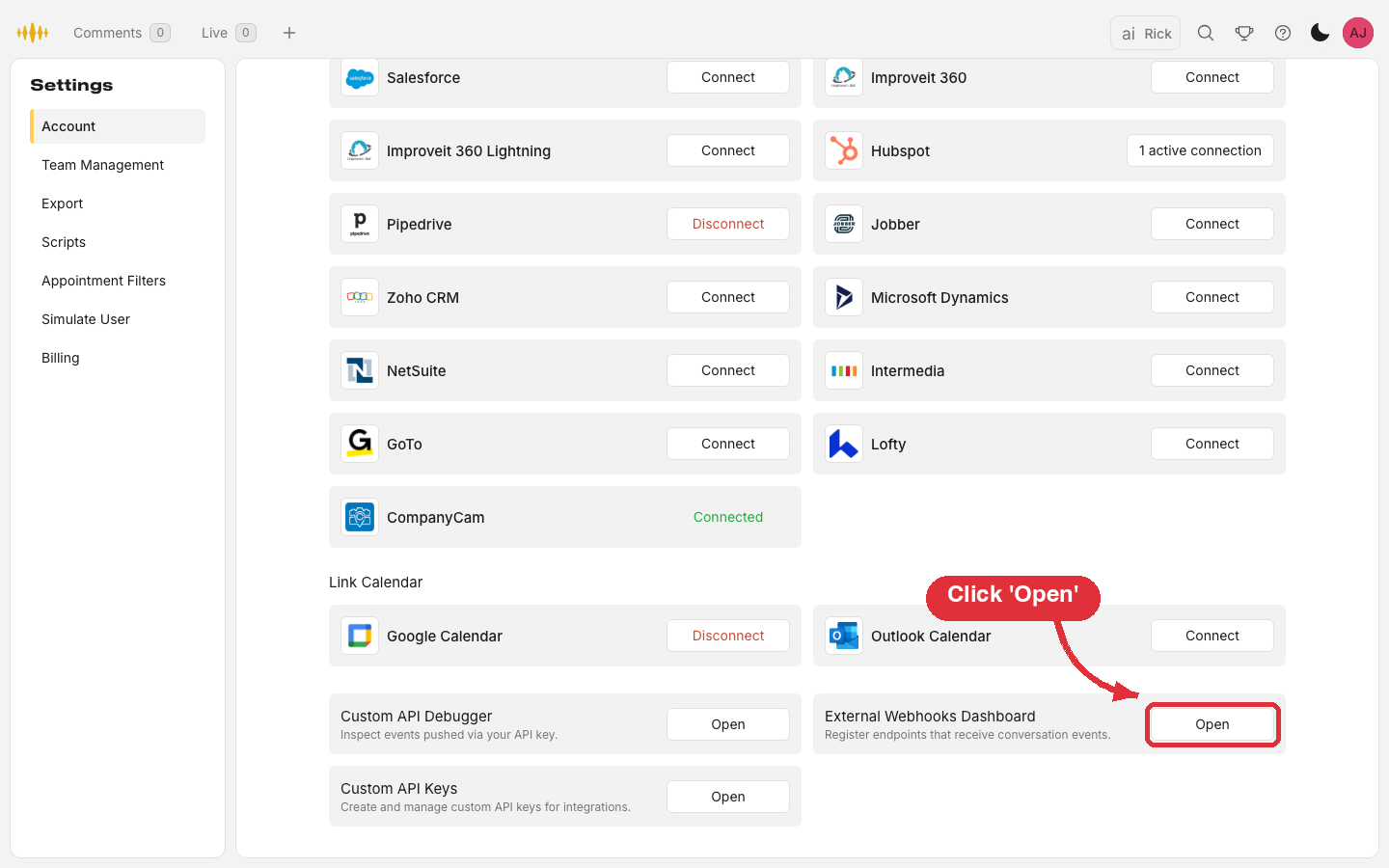
In the Rilla web app, go to Settings → Account and scroll to the bottom. Click Open on the External Webhooks Dashboard card.
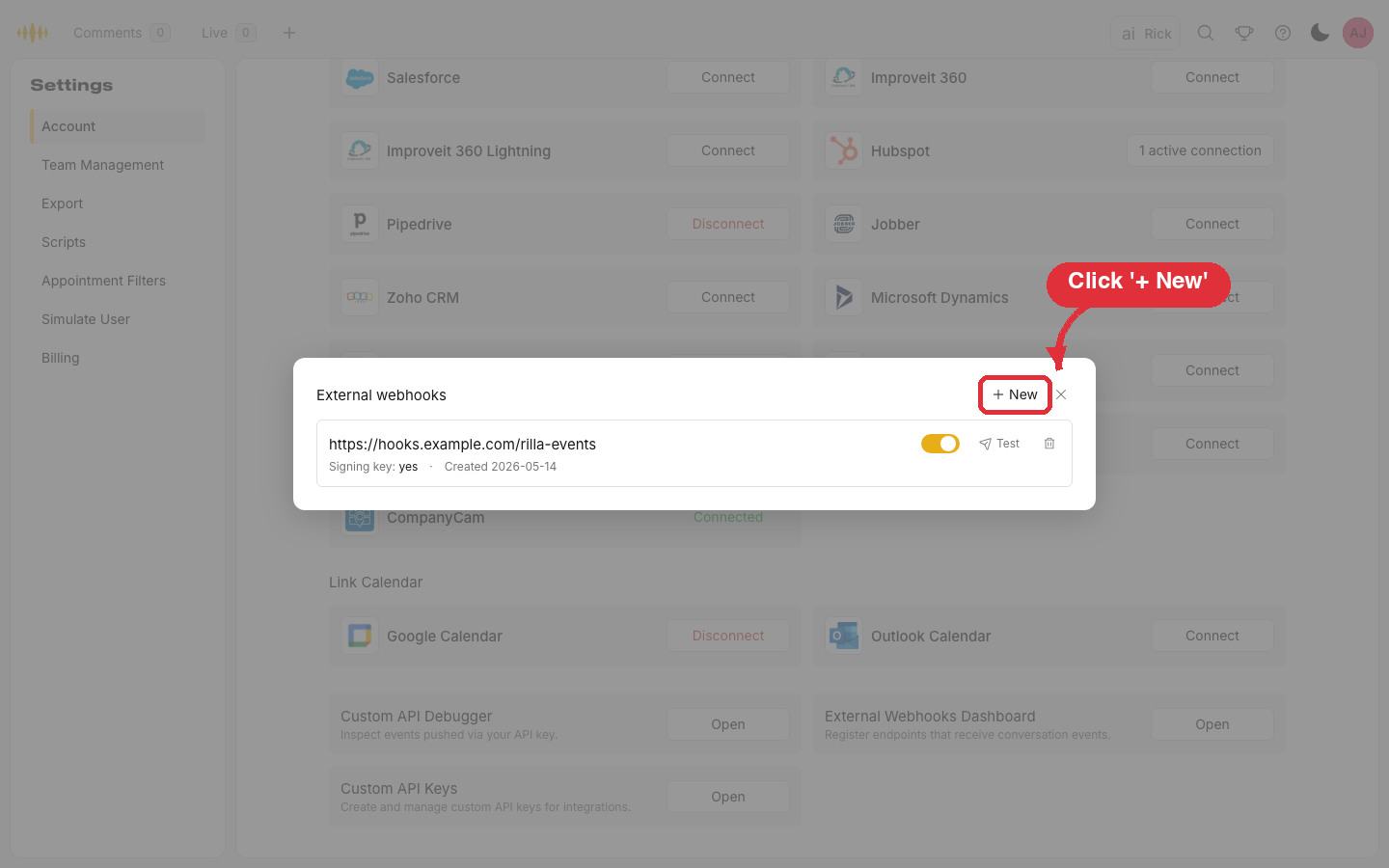
The dialog lists your organization's existing webhooks. Click + New.
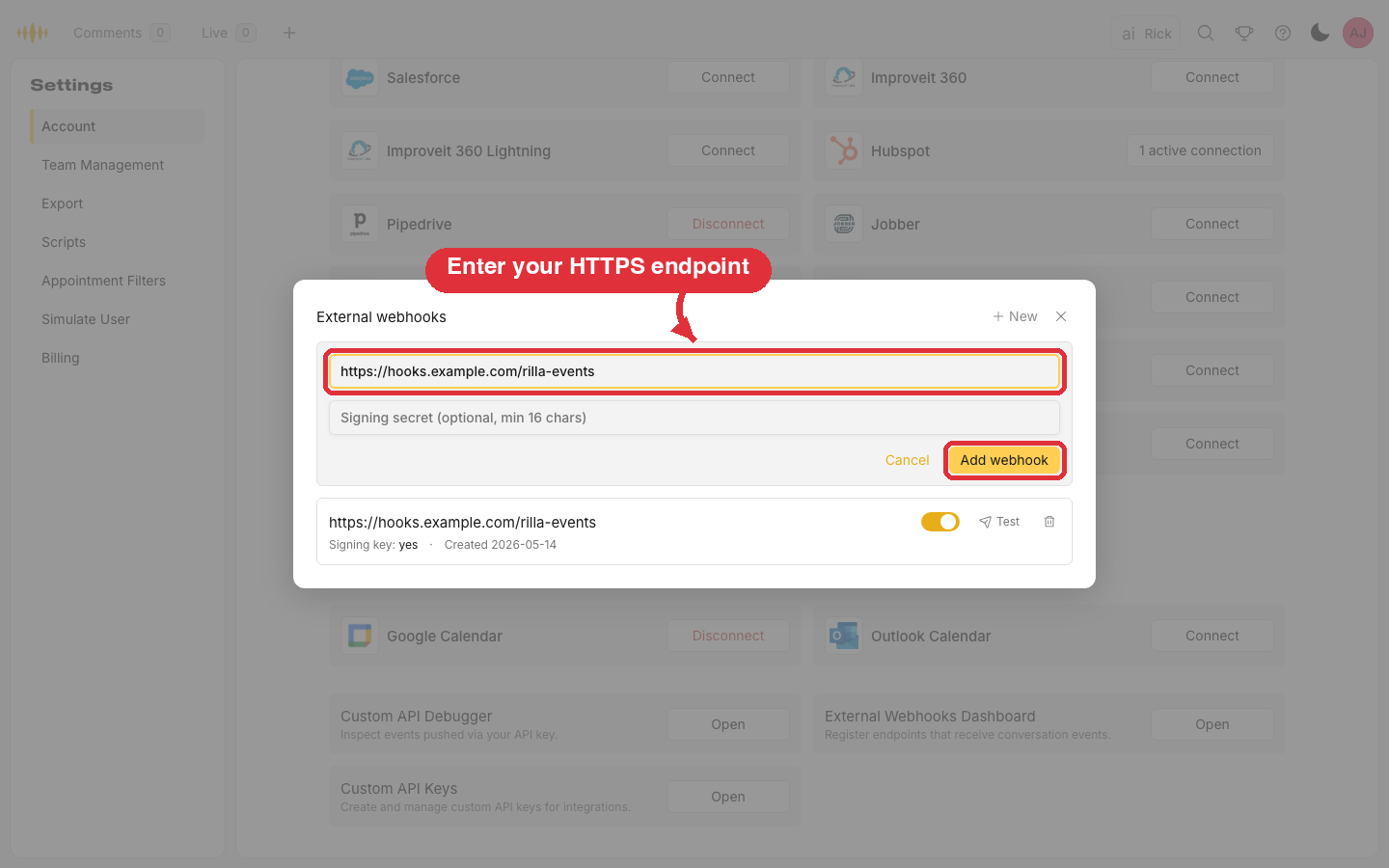
Enter the HTTPS URL we should deliver events to, optionally set a signing secret, and click Add webhook. Delivery starts with the next conversation that finishes processing.
Testing your endpoint
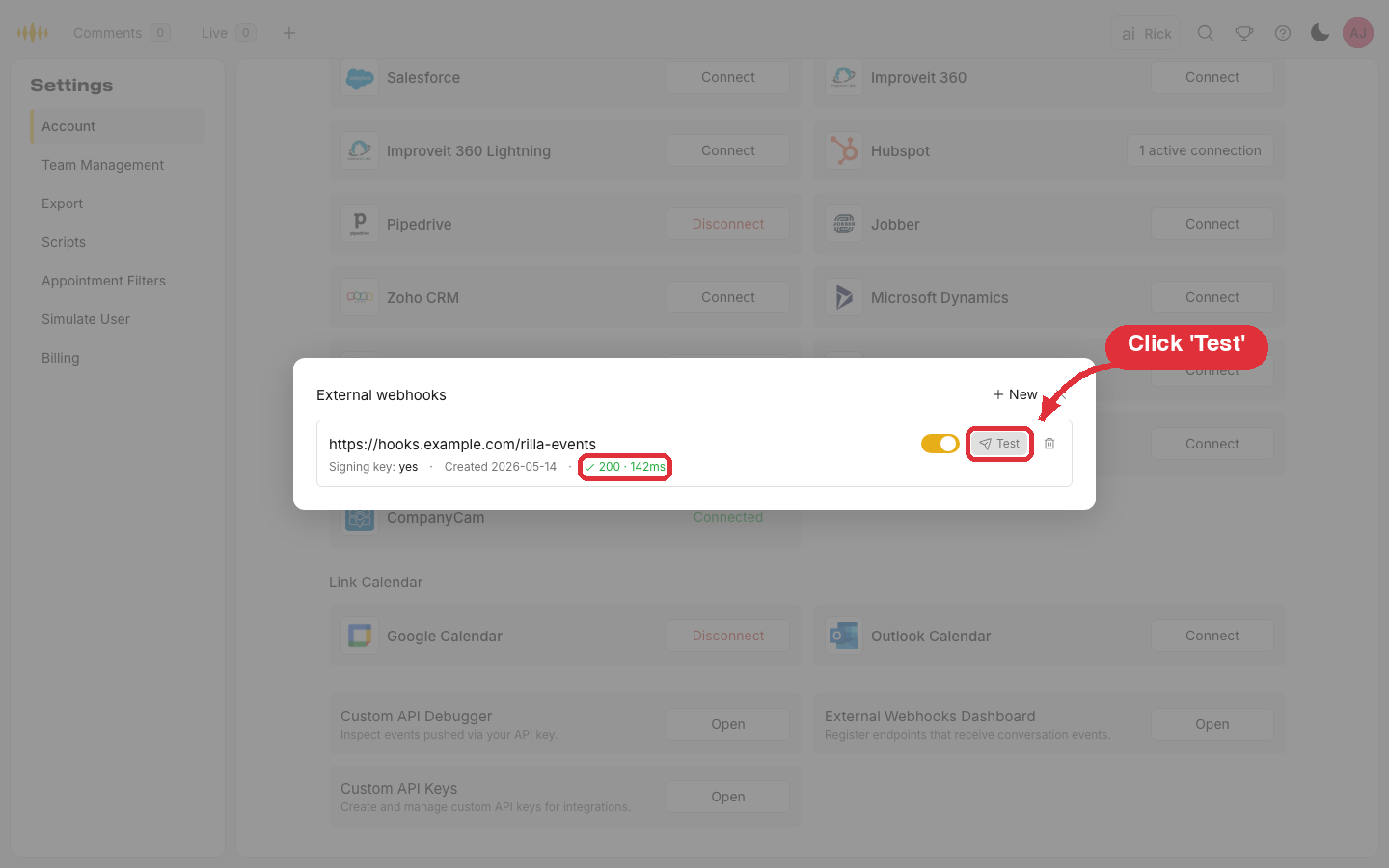
Each subscription has a Test button that sends a sample conversation_processed-shaped envelope to your URL with event_type: "test". The sample event is signed with your real signing secret, so a successful test confirms both that your endpoint is reachable and that your signature verification logic accepts the format Rilla sends.
The Test button reports the HTTP status code your endpoint returned. A 2xx means we received a successful response. Anything else surfaces the status code or error so you can debug.
Payload
Every event is a single JSON object with a stable envelope and an event_type-specific data block.
Headers
| Header | Description |
|---|---|
Content-Type | Always application/json. |
X-Rilla-Signature | sha256=<hex> HMAC of the raw body, using your signing secret. Only present if you registered a signing secret. See Verifying signatures. |
Envelope
| Field | Type | Description |
|---|---|---|
webhook_event_id | string (uuid) | Unique ID for this delivery attempt's logical event. Idempotency key — the same webhook_event_id may be retried, but a successful 2xx response will not re-deliver. |
event_type | string | conversation_processed for real events, or test when triggered from the Test button in the dashboard. The data shape is the same for both; test events use a fixed sample conversation. |
sent_at | string (ISO 8601) | Server time when this attempt was constructed. |
data | object | Event-specific payload. See below. |
conversation_processed data
| Field | Type | Description |
|---|---|---|
conversation_id | string (uuid) | Rilla conversation ID. Stable across redeliveries. |
organization_id | string (uuid) | Your Rilla organization ID. |
conversation_url | string | Direct link to the conversation in the Rilla web app. |
transcript_url | string | null | Presigned link to the conversation's transcript as JSON (an array of speaker-tagged words with timings). The link expires about 6 hours after the event is sent, so fetch or store it promptly. null if a transcript isn't available. |
user_id | string (uuid) | Rilla user (the rep) the conversation belongs to. |
user_email | string | Email of the rep. |
recorded_at | string (ISO 8601) | When the recording was made. |
recording_duration_seconds | number | Length of the recording, in seconds. |
summary | string | null | AI-generated conversation summary. null if not generated. |
custom_insights | string | null | AI-generated custom insights configured for your org. null if none. |
surveys | array | Per-survey results for any surveys configured on the org. See Survey object. |
appointment_id | string | null | The CRM appointment ID this recording is matched to, if any. |
Survey object
| Field | Type | Description |
|---|---|---|
surveyId | string (uuid) | Survey definition ID. |
conversationId | string (uuid) | Same conversation ID as the envelope. |
surveyName | string | Human-readable name of the survey. |
createdAt | string (ISO 8601) | When this survey result was generated. |
data | object | Free-form survey responses, keyed by question. Shape depends on your survey definition. |
Example body
{
  "webhook_event_id": "8d3e1c4a-7b2f-4a13-b3a5-2c5d49ce4f10",
  "event_type": "conversation_processed",
  "sent_at": "2026-05-08T19:42:11.418Z",
  "data": {
    "conversation_id": "f1a3e9d8-2b46-4c1a-9c7e-7e4a18d2c93f",
    "organization_id": "1907eddc-64da-4c60-9cc2-f30841635050",
    "conversation_url": "https://app.rillavoice.com/conversations/single?id=f1a3e9d8-2b46-4c1a-9c7e-7e4a18d2c93f",
    "transcript_url": "https://rillavoice-processed-audio.s3.us-east-1.amazonaws.com/1907eddc-64da-4c60-9cc2-f30841635050/c986c3da-30ba-4d07-8fb8-b8ed38ca7241/1780249759000_transcript.json?X-Amz-Algorithm=AWS4-HMAC-SHA256&X-Amz-Expires=21600&X-Amz-Signature=EXAMPLE",
    "user_id": "a52b8c7d-3e1f-4a90-9b22-6d18e7f4c521",
    "user_email": "rep@yourcompany.com",
    "recorded_at": "2026-05-08T18:35:00.000Z",
    "recording_duration_seconds": 2143,
    "summary": "Customer expressed interest in the premium package and asked about financing. Rep walked through the 36-month plan and scheduled a follow-up for next week.",
    "custom_insights": "Strong buying signal at 12:30. Pricing objection handled cleanly. Follow-up date confirmed.",
    "surveys": [
      {
        "surveyId": "5e0c3bac-6737-4fdc-a7bc-acbb7f4ccd6f",
        "conversationId": "f1a3e9d8-2b46-4c1a-9c7e-7e4a18d2c93f",
        "surveyName": "Discovery Call Quality",
        "createdAt": "2026-05-08T19:41:55.802Z",
        "data": {
          "rapport_built": "yes",
          "discovery_questions_asked": 7,
          "next_step_confirmed": true
        }
      }
    ],
    "appointment_id": "appt-1234"
  }
}
Verifying signatures
If you registered a signing secret, every request includes an X-Rilla-Signature header:
X-Rilla-Signature: sha256=4f1ce1e3d9a7b2c45e7c1a89f3b4d2e6...The hex value after sha256= is the HMAC-SHA256 of the raw request body using your shared secret. To verify:
- Read the raw body bytes (do not re-serialize the parsed JSON — whitespace and key order matter).
- Compute
HMAC-SHA256(secret, raw_body)and hex-encode it. - Compare it to the value in the header using a constant-time comparison.
If the values don't match, reject the request.
Always verify the signature in production. Without it, anyone who learns your endpoint URL could forge events. Rilla never delivers to non-HTTPS endpoints, but TLS alone doesn't authenticate the sender.
Python verification
import hmac
import hashlib

def verify(raw_body: bytes, header: str, secret: str) -> bool:
    if not header.startswith("sha256="):
        return False
    expected = hmac.new(secret.encode(), raw_body, hashlib.sha256).hexdigest()
    return hmac.compare_digest(expected, header.removeprefix("sha256="))
Node.js verification
import { createHmac, timingSafeEqual } from "crypto";

function verify(rawBody, header, secret) {
  if (!header?.startsWith("sha256=")) return false;
  const expected = createHmac("sha256", secret).update(rawBody).digest("hex");
  const provided = header.slice("sha256=".length);
  if (expected.length !== provided.length) return false;
  return timingSafeEqual(Buffer.from(expected), Buffer.from(provided));
}
Retries and delivery
| Behavior | Value |
|---|---|
| Success criterion | HTTP 2xx response within 10 seconds. |
| Failure criterion | Non-2xx, network error, or timeout (>10s). |
| Max attempts | 3. |
| Backoff | Attempt 1 → wait 5 min → attempt 2 → wait 15 min → attempt 3. |
| After final failure | Event is moved to a Rilla-side dead-letter queue. We do not redeliver automatically. |
| Ordering | Events for one conversation are not strictly ordered. Use recorded_at and sent_at if you need to reason about timing. |
Idempotency
webhook_event_id is the idempotency key for a single delivery. If the same event is retried (because your endpoint timed out or 5xx'd), the retry uses the same webhook_event_id. Two different conversations always have different IDs. To make your handler safe under retries:
- Track which
webhook_event_idvalues you've already accepted. - On a duplicate, return
200and skip the rest of your processing.
In rare network conditions Rilla may send a retry even after your endpoint successfully processed the original. Idempotency on your side is the simplest defense.
What to do when your endpoint is down
A few minutes of downtime is fine — retries usually cover it. For longer outages, contact your Rilla account manager: we can replay events from our DLQ once your service is healthy again.
Code examples
Python (FastAPI)
import hmac
import hashlib
from fastapi import FastAPI, Header, HTTPException, Request

app = FastAPI()
SECRET = "your-shared-secret"

@app.post("/rilla/webhook")
async def rilla_webhook(
    request: Request,
    x_rilla_signature: str = Header(None),
):
    raw_body = await request.body()

    if x_rilla_signature is None or not x_rilla_signature.startswith("sha256="):
        raise HTTPException(401, "missing signature")

    expected = hmac.new(SECRET.encode(), raw_body, hashlib.sha256).hexdigest()
    provided = x_rilla_signature.removeprefix("sha256=")
    if not hmac.compare_digest(expected, provided):
        raise HTTPException(401, "bad signature")

    event = await request.json()
    if event["event_type"] == "conversation_processed":
        conversation_id = event["data"]["conversation_id"]
        # ... handle the event idempotently using event["webhook_event_id"] ...

    return {"ok": True}
Node.js (Express)
import express from "express";
import { createHmac, timingSafeEqual } from "crypto";

const app = express();
const SECRET = "your-shared-secret";

// Capture the raw body — express.json() drops it.
app.use(
  express.json({
    verify: (req, _res, buf) => {
      req.rawBody = buf;
    },
  }),
);

app.post("/rilla/webhook", (req, res) => {
  const header = req.header("X-Rilla-Signature") ?? "";
  if (!header.startsWith("sha256=")) return res.status(401).end();

  const expected = createHmac("sha256", SECRET)
    .update(req.rawBody)
    .digest("hex");
  const provided = header.slice("sha256=".length);
  if (
    expected.length !== provided.length ||
    !timingSafeEqual(Buffer.from(expected), Buffer.from(provided))
  ) {
    return res.status(401).end();
  }

  const event = req.body;
  if (event.event_type === "conversation_processed") {
    // ... idempotent processing keyed on event.webhook_event_id ...
  }

  res.status(200).end();
});
Smoke test with cURL
curl -i -X POST "https://your-app.example.com/rilla/webhook" \
  -H "Content-Type: application/json" \
  -H "X-Rilla-Signature: sha256=4f1ce1e3d9a7b2c45e7c1a89f3b4d2e6..." \
  -d '{
    "webhook_event_id": "test-event-1",
    "event_type": "conversation_processed",
    "sent_at": "2026-05-08T19:42:11.418Z",
    "data": {
      "conversation_id": "f1a3e9d8-2b46-4c1a-9c7e-7e4a18d2c93f",
      "organization_id": "1907eddc-64da-4c60-9cc2-f30841635050",
      "conversation_url": "https://app.rillavoice.com/conversations/single?id=f1a3e9d8-2b46-4c1a-9c7e-7e4a18d2c93f",
      "transcript_url": null,
      "user_id": "a52b8c7d-3e1f-4a90-9b22-6d18e7f4c521",
      "user_email": "rep@yourcompany.com",
      "recorded_at": "2026-05-08T18:35:00.000Z",
      "recording_duration_seconds": 2143,
      "summary": null,
      "custom_insights": null,
      "surveys": [],
      "appointment_id": null
    }
  }'
Support
Questions, signing secret rotations, replay requests, or signup: contact your Rilla account manager or support@rilla.com.