

Custom CRM API (importing into Rilla)
Push appointments and recordings into Rilla from your scheduling system.
Overview
When a person is scheduled for an appointment in your system, send a POST request to the Rilla API. Rilla creates the appointment record and links it for analysis and coaching — either when the user submits a recording through the app, or automatically when you include a recording URL in the request. If a recording and a calendar event were created separately, you can link them after the fact with POST /custom/appointment/match.
Base URL
https://api.apirilla.comAuthentication
Learn how to authenticate your requests with an API key.
Endpoints
Explore the available API endpoints.
Code Examples
Copy-paste examples in Python, JavaScript, and cURL.
Custom API Debugger
Inspect every event Rilla received and verify your integration.
How it works
Create an API key from Settings → Account → Custom API Keys (admins), or ask your Rilla account manager for one, and store it securely. See Obtaining an API Key.
POST appointment data (event ID, user email, times, customer info) when events are created or updated in your system.
Include a media_url in the payload to have Rilla automatically ingest a recording for that appointment.
Send a DELETE request with the appointment ID if an event is cancelled so Rilla stays in sync.
Authentication
All requests to the Custom CRM API must include a valid API key in the x-api-key request header.
POST /custom/appointment HTTP/1.1
Host: api.apirilla.com
x-api-key: YOUR_API_KEY
Content-Type: application/json
Request Headers
| Header | Type | Required | Description |
|---|---|---|---|
x-api-key | string | Yes | API key given to you by Rilla. |
Content-Type | string | Yes | Must be application/json. |
Accept | string | No | Customize response type. Supported: text/plain (default), application/json. |
Obtaining an API Key
Organization admins can create and manage API keys directly in the Rilla web app. Each key is scoped to a single Rilla organization.
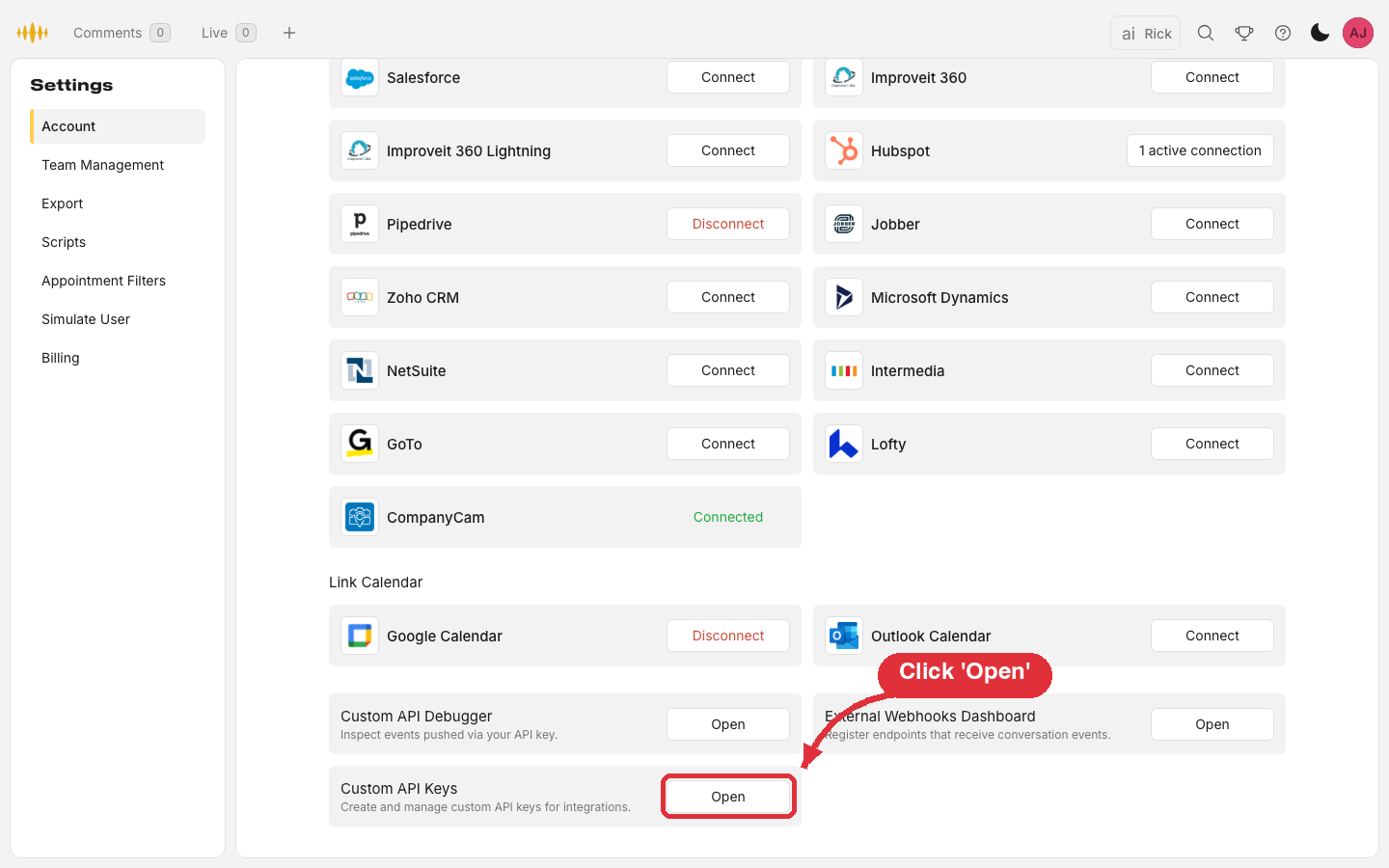
In the Rilla web app, go to Settings → Account and scroll to the bottom. Click Open on the Custom API Keys card. This section is only visible to admins.
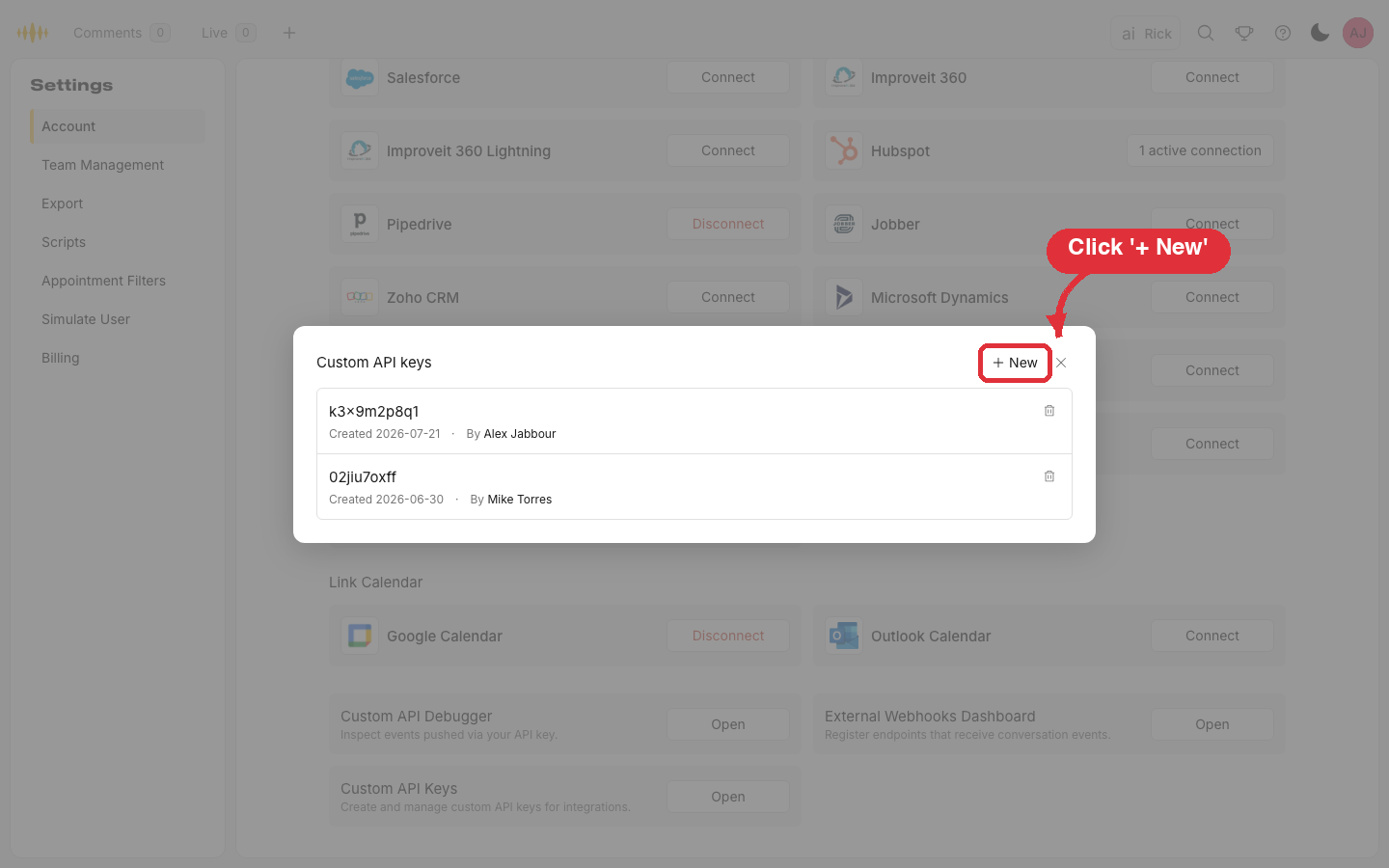
The dialog lists your organization's existing keys — the key ID, when it was created, and who created it. The secret value is never shown here. Click + New.
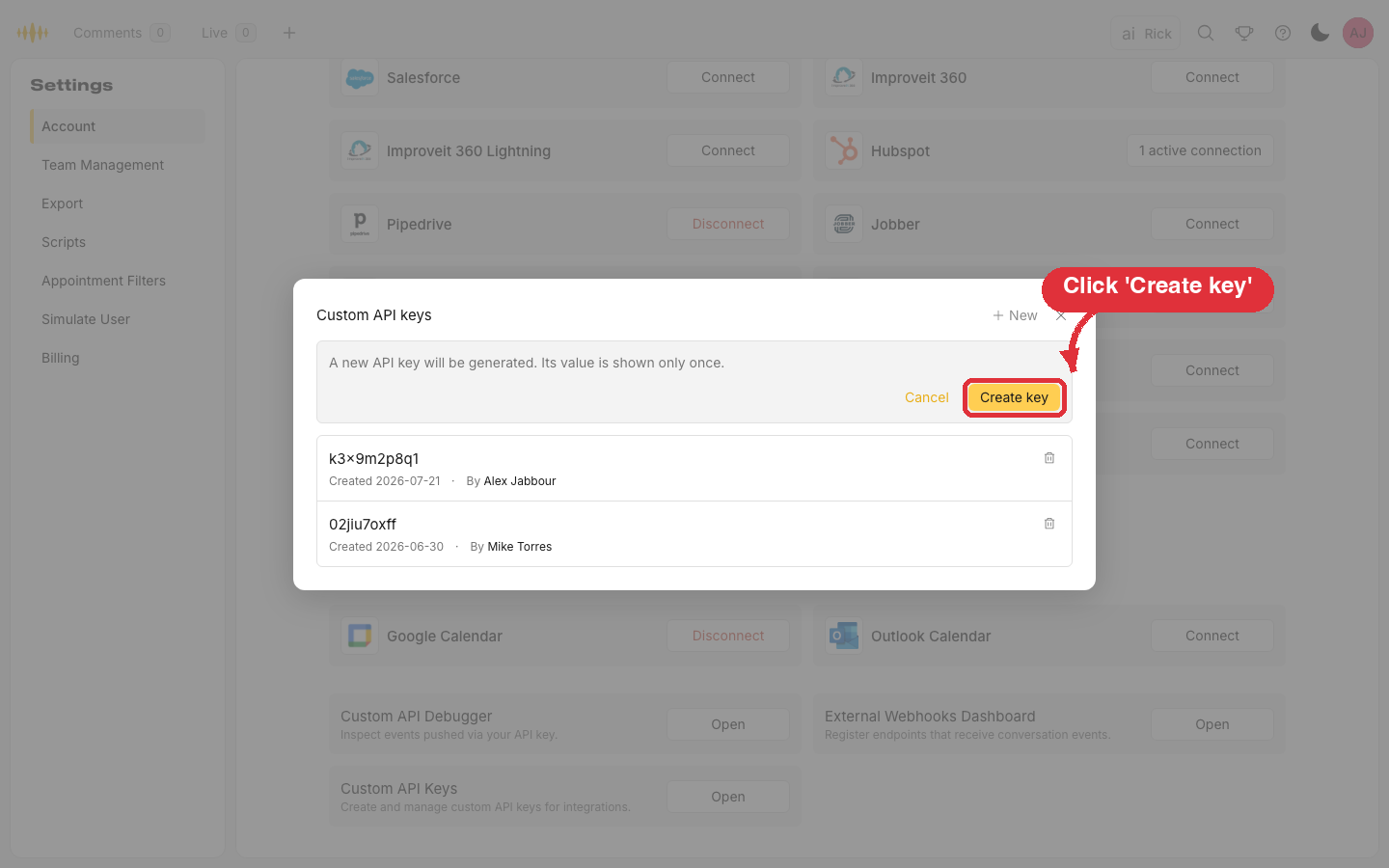
Click Create key. Rilla generates the key and it is active immediately.
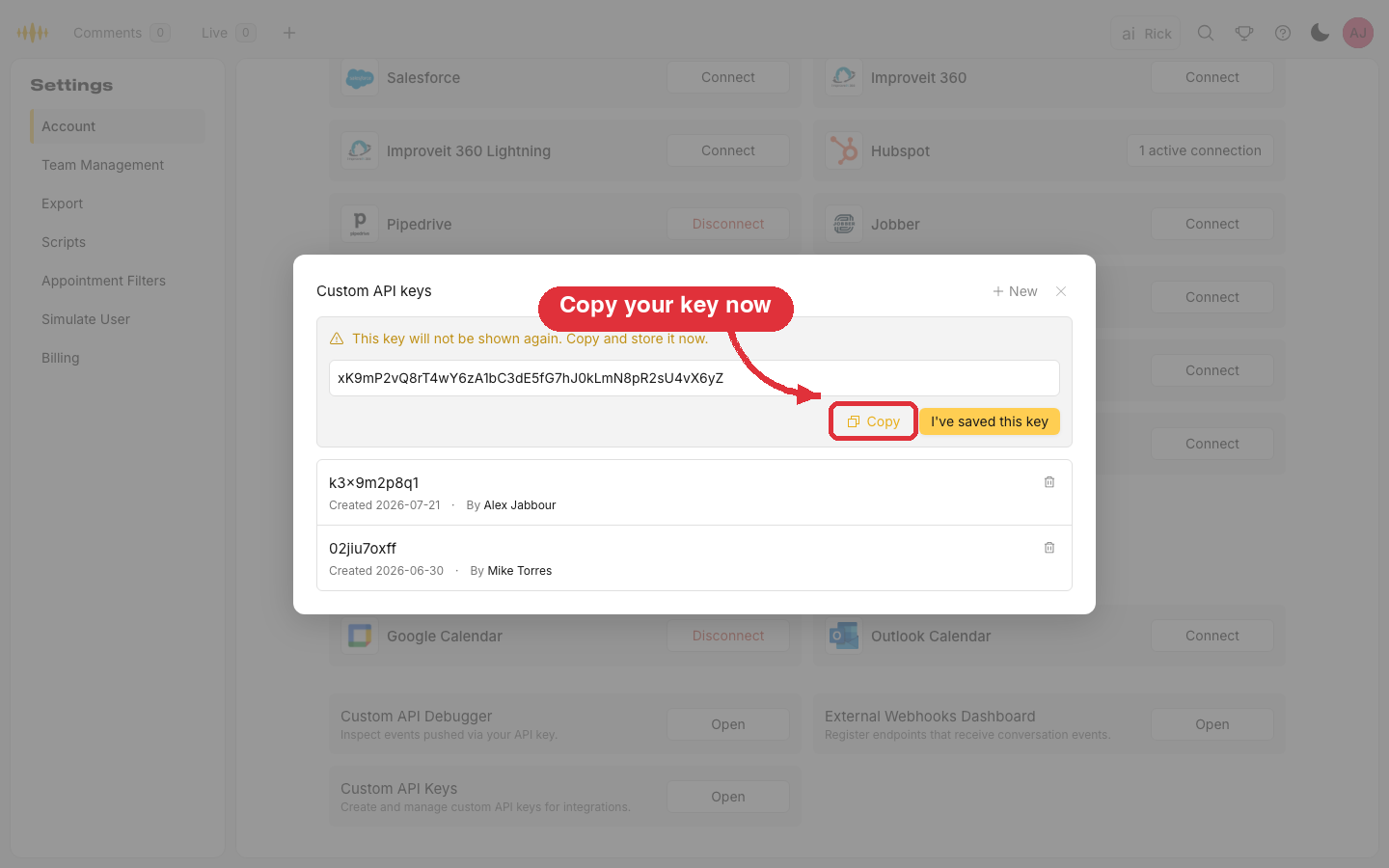
The key value is displayed exactly once. Copy it and store it somewhere secure, then click I've saved this key. The value can never be viewed again — if it is lost, delete the key and create a new one.
Click the trash icon next to a key and confirm. Deletion takes effect immediately and cannot be undone: any integration still sending requests with that key loses access.
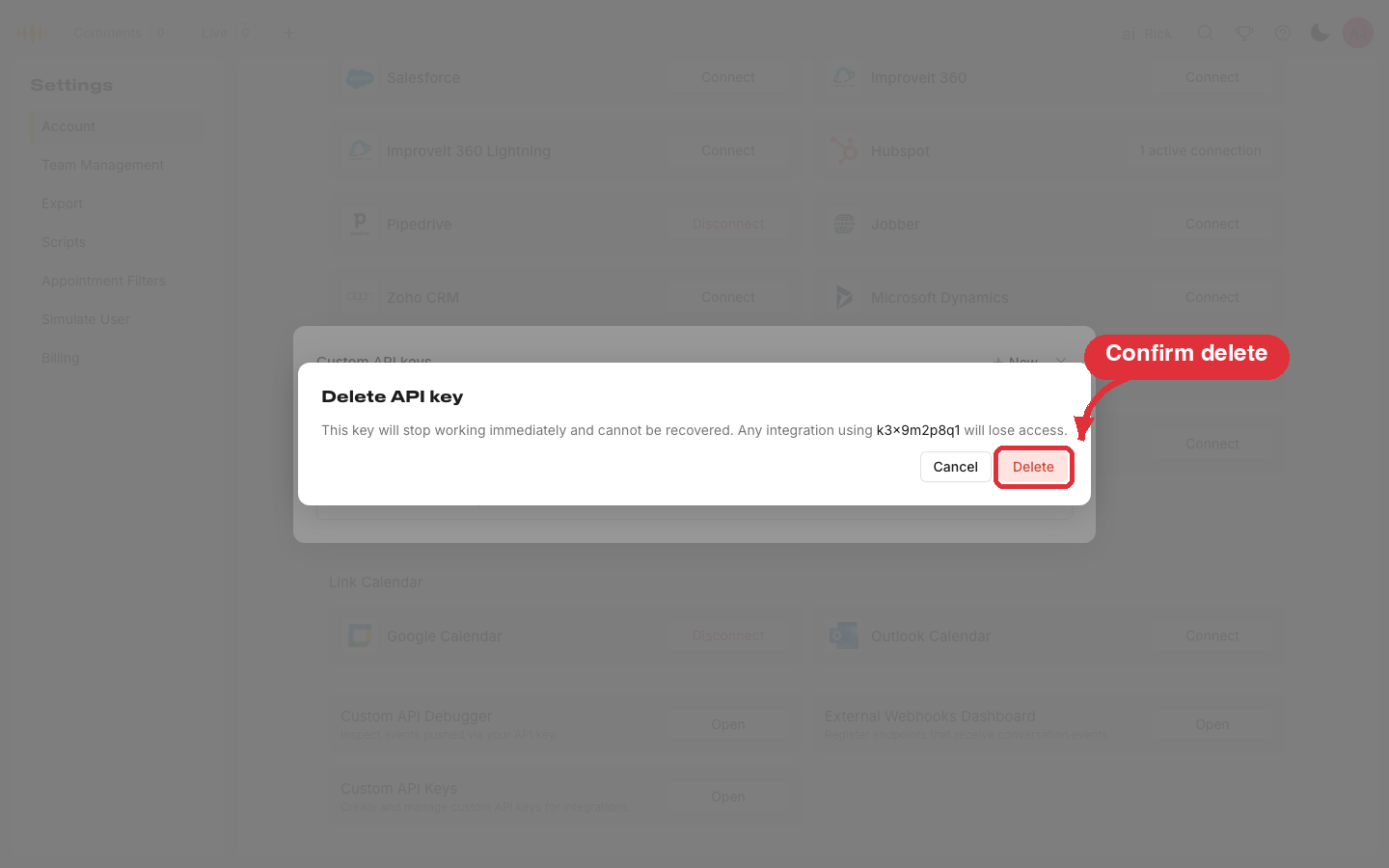
If you don't see the Custom API Keys section, ask an admin on your account to create the key for you, or reach out to your Rilla account manager or customer success manager.
Your API key is enforced at the API gateway. If the x-api-key header is missing or not recognized, the request is rejected with 403 Forbidden before it reaches the application. A recognized key that isn't mapped to an active Rilla organization returns 422 Unprocessable Entity.
Keep your key secure
API keys grant access to your organization's data. Do not expose them in client-side code, public repositories, or logs. Contact support@rilla.com immediately if a key is ever compromised.
POST /custom/appointment
Creates a new appointment or updates an existing one. Rilla uses event_id to determine whether to insert or update.
Request Headers
| Header | Type | Required | Description |
|---|---|---|---|
x-api-key | string | Yes | Your Rilla API key. |
Content-Type | string | Yes | Must be application/json. |
Accept | string | No | text/plain (default) or application/json. |
Request Body
| Field | Type | Required | Description |
|---|---|---|---|
event_id | string | Yes | ID for the event. |
user_email | string | Yes | Email of the rep who has the appointment. Used to match to the correct Rilla user. |
start_time | string | Yes | Start of the event (UTC): "yyyy-mm-dd hh:mm:ss". |
end_time | string | Yes | End of the event (UTC): "yyyy-mm-dd hh:mm:ss". |
title | string | Yes | Title of the event. Recommend including the customer name. |
customer | object | Yes | Customer/contact info. See Customer Object. |
result | string | No | Outcome of the appointment (e.g. "won", "lost"). |
type | string | No | The type of appointment. |
price | float | No | The price quoted in the appointment. |
media_url | string | No | URL of a hosted audio file. If provided, Rilla streams and processes the recording automatically. |
recording_type | string | No | Required when media_url is provided. One of: CALL_AUDIO, APPOINTMENT_AUDIO, CALL_AUDIO_WITH_LOCATION. See Recording Types. |
location | string | No | Required when recording_type is CALL_AUDIO_WITH_LOCATION. Determines Voice-ID assignment group. |
lead_source | string | No | Source of the lead (e.g. "Salesforce"). |
custom_fields | object | No | Any additional fields to store in Rilla for this appointment. |
start_time and end_time must be in UTC. If not sent in UTC, appointments will not match and users will receive notifications at the wrong time.
How times are displayed
Rilla stores start_time and end_time as UTC, exactly as you send them, and displays them in local time in the app and the Custom API Debugger. A time sent as midnight UTC appears as the previous evening in US time zones. For example, 2024-06-22 00:00:00 UTC shows as Jun 21, 8:00 PM Eastern. The stored value is unchanged; only the display is converted. To make an appointment read as a specific local time, send the UTC equivalent of that local time.
Example — Create
{
  "event_id": "appt-1234",
  "user_email": "rep@yourcompany.com",
  "start_time": "2024-06-15 14:00:00",
  "end_time": "2024-06-15 15:00:00",
  "title": "Home Estimate - Jane Smith",
  "customer": {
    "id": "cust-567",
    "name": "Jane Smith",
    "email": "jane@example.com",
    "phone": "555-867-5309"
  },
  "result": "won",
  "price": 4500.00,
  "lead_source": "Facebook"
}
Updating an Appointment
To update an event, use the same POST endpoint. Only event_id and user_email are required. Any other included field will be updated; omitted fields remain unchanged.
{
  "event_id": "appt-1234",
  "user_email": "rep@yourcompany.com",
  "result": "lost"
}
Outcomes are created automatically
result is free-form. Rilla matches the value to your organization's existing outcomes (case-insensitively) and creates a new outcome if it doesn't match any. There's no fixed list to pick from, so send a consistent set of values. A typo like "Pendng Sale" creates a new, separate outcome.
Responses
| Status | Description |
|---|---|
200 OK | The appointment was created or updated successfully. |
400 Bad Request | Malformed request or missing required fields. |
403 Forbidden | x-api-key is missing or not recognized (enforced at the API gateway). |
422 Unprocessable Entity | Valid JSON but cannot be processed (e.g. user_email not in Rilla or in a different organization). |
500 Internal Server Error | Unexpected server error. |
DELETE /custom/appointment/{id}
Deletes an appointment from Rilla. No request body is needed. Use this when an appointment is cancelled in your system to keep data in sync.
Path Parameters
| Parameter | Type | Required | Description |
|---|---|---|---|
id | string | Yes | The event_id used when the appointment was originally created. |
Request Headers
| Header | Type | Required | Description |
|---|---|---|---|
x-api-key | string | Yes | Your Rilla API key. |
Example Request
DELETE /custom/appointment/appt-1234 HTTP/1.1
Host: api.apirilla.com
x-api-key: YOUR_API_KEY
Responses
| Status | Description |
|---|---|
200 OK | The appointment was deleted successfully. |
403 Forbidden | x-api-key is missing or not recognized. |
404 Not Found | No appointment with that ID exists for your organization. |
409 Conflict | The appointment has a recording linked to it and cannot be deleted. |
500 Internal Server Error | Unexpected server error. |
POST /custom/appointment/match
Links a calendar event Rilla already has on file for your organization to an existing Rilla conversation. Use this when a recording and a calendar event were created separately — for example, the rep recorded through the app before the appointment was pushed — and you want to associate them after the fact.
Both records must already exist. This endpoint creates and updates nothing else: it only sets the matched conversation's recording appointment_id to the calendar event. To create or update the appointment itself, use POST /custom/appointment.
Matching is idempotent — re-matching a conversation overwrites any previous link, so it's safe to retry. All lookups run before anything is written, so a request that fails validation changes nothing.
Request Headers
| Header | Type | Required | Description |
|---|---|---|---|
x-api-key | string | Yes | Your Rilla API key. |
Content-Type | string | Yes | Must be application/json. |
Accept | string | No | text/plain (default) or application/json. |
Request Body
| Field | Type | Required | Description |
|---|---|---|---|
event_id | string | Yes | The external ID of a calendar event Rilla already has on file for your organization — typically one you sent via POST /custom/appointment. |
conversation_id | string (UUID) | Yes | ID of an existing Rilla conversation to link — for example, a conversation_id received from a webhook or the Data Export API. |
Example Request
POST /custom/appointment/match HTTP/1.1
Host: api.apirilla.com
x-api-key: YOUR_API_KEY
Content-Type: application/json
{
"event_id": "appt-1234",
"conversation_id": "f1a3e9d8-2b46-4c1a-9c7e-7e4a18d2c93f"
}Responses
On success the response body is the plain string Successfully matched conversation to event.
| Status | Body | When |
|---|---|---|
200 OK | Successfully matched conversation to event | The conversation's recording was linked to the event. |
400 Bad Request | Invalid JSON data | The request body is not valid JSON. |
400 Bad Request | Missing some required parameters in the body | event_id or conversation_id is missing. |
404 Not Found | Event not found | No calendar event with that event_id exists for your organization. |
404 Not Found | Conversation not found | No conversation with that conversation_id exists in your organization. |
403 Forbidden | Forbidden | x-api-key is missing or not recognized (enforced at the API gateway). |
422 Unprocessable Entity | Conversation has no recording to link | The conversation exists but has no recording attached. |
422 Unprocessable Entity | Conversation's recording could not be found to link | The conversation's recording could not be found while linking. |
500 Internal Server Error | — | Unexpected server error. |
Cross-org lookups return 404
A conversation_id that belongs to a different organization returns the same Conversation not found response as one that doesn't exist. Rilla never reveals whether a conversation exists outside your organization.
Data Models
Appointment Object
| Field | Type | Description |
|---|---|---|
event_id | string | ID for the event. |
user_email | string | Email of the rep who has the appointment. |
start_time | string | Start of the event (UTC): "yyyy-mm-dd hh:mm:ss". |
end_time | string | End of the event (UTC): "yyyy-mm-dd hh:mm:ss". |
title | string | Title of the event. |
customer | object | Customer/contact info. |
customer.id | string | ID for the customer. |
customer.name | string | Full name of the customer. |
customer.email | string | Email of the customer. |
customer.phone | string | Phone number of the customer. |
customer.address | string | Address of the customer. |
result | string | Outcome of the appointment (e.g. "won", "lost"). |
type | string | The type of appointment. |
price | float | Price quoted in the appointment. |
media_url | string | URL of a hosted audio file. |
recording_type | string | One of: CALL_AUDIO, APPOINTMENT_AUDIO, CALL_AUDIO_WITH_LOCATION. |
location | string | Voice-ID assignment group (used with CALL_AUDIO_WITH_LOCATION). |
lead_source | string | Source of the lead. |
custom_fields | object | Additional custom fields. |
Customer Object
| Field | Type | Required | Description |
|---|---|---|---|
id | string | Yes | ID for the customer. |
name | string | Yes | Full name of the customer. |
email | string | No | Email of the customer. |
phone | string | No | Phone number of the customer. |
address | string | No | Address of the customer. |
Recording Types
| Type | Description |
|---|---|
CALL_AUDIO | The recording is a dialer call. |
APPOINTMENT_AUDIO | The recording is an in-person appointment. |
CALL_AUDIO_WITH_LOCATION | Dialer call with Voice-ID assignment via location. |
Code Examples
Create an Appointment
import requests

url = "https://api.apirilla.com/custom/appointment"
headers = {
    "x-api-key": "YOUR_API_KEY",
    "Content-Type": "application/json"
}
payload = {
    "event_id": "appt-1234",
    "user_email": "rep@yourcompany.com",
    "start_time": "2024-06-15 14:00:00",
    "end_time": "2024-06-15 15:00:00",
    "title": "Home Estimate - Jane Smith",
    "customer": {
        "id": "cust-567",
        "name": "Jane Smith",
        "email": "jane@example.com",
        "phone": "555-867-5309"
    },
    "result": "won",
    "price": 4500.00,
    "lead_source": "Facebook"
}
response = requests.post(url, json=payload, headers=headers)
print(response.status_code, response.text)
const response = await fetch('https://api.apirilla.com/custom/appointment', {
method: 'POST',
headers: {
'x-api-key': 'YOUR_API_KEY',
'Content-Type': 'application/json',
},
body: JSON.stringify({
event_id: 'appt-1234',
user_email: 'rep@yourcompany.com',
start_time: '2024-06-15 14:00:00',
end_time: '2024-06-15 15:00:00',
title: 'Home Estimate - Jane Smith',
customer: { id: 'cust-567', name: 'Jane Smith' },
result: 'won',
price: 4500.00,
}),
})curl -X POST https://api.apirilla.com/custom/appointment \
-H "x-api-key: YOUR_API_KEY" \
-H "Content-Type: application/json" \
-d '{
"event_id": "appt-1234",
"user_email": "rep@yourcompany.com",
"start_time": "2024-06-15 14:00:00",
"end_time": "2024-06-15 15:00:00",
"title": "Home Estimate - Jane Smith",
"customer": {"id": "cust-567", "name": "Jane Smith"},
"result": "won"
}'Update an Appointment
POST to the same endpoint with event_id, user_email, and only the fields you want to change. Omitted fields remain unchanged.
import requests

url = "https://api.apirilla.com/custom/appointment"
headers = {
    "x-api-key": "YOUR_API_KEY",
    "Content-Type": "application/json"
}
payload = {
    "event_id": "appt-1234",
    "user_email": "rep@yourcompany.com",
    "result": "lost"
}
response = requests.post(url, json=payload, headers=headers)
print(response.status_code, response.text)
const response = await fetch('https://api.apirilla.com/custom/appointment', {
method: 'POST',
headers: {
'x-api-key': 'YOUR_API_KEY',
'Content-Type': 'application/json',
},
body: JSON.stringify({
event_id: 'appt-1234',
user_email: 'rep@yourcompany.com',
result: 'lost',
}),
})curl -X POST https://api.apirilla.com/custom/appointment \
-H "x-api-key: YOUR_API_KEY" \
-H "Content-Type: application/json" \
-d '{"event_id": "appt-1234", "user_email": "rep@yourcompany.com", "result": "lost"}'Delete an Appointment
import requests

event_id = "appt-1234"
url = f"https://api.apirilla.com/custom/appointment/{event_id}"
headers = {"x-api-key": "YOUR_API_KEY"}
response = requests.delete(url, headers=headers)
print(response.status_code, response.text)
const eventId = 'appt-1234'
const response = await fetch(
`https://api.apirilla.com/custom/appointment/${eventId}`,
{
method: 'DELETE',
headers: { 'x-api-key': 'YOUR_API_KEY' },
}
)curl -X DELETE https://api.apirilla.com/custom/appointment/appt-1234 \
-H "x-api-key: YOUR_API_KEY"Match a Conversation to an Event
Link an existing conversation to a calendar event Rilla already has for your organization. Both must already exist.
import requests

url = "https://api.apirilla.com/custom/appointment/match"
headers = {
    "x-api-key": "YOUR_API_KEY",
    "Content-Type": "application/json"
}
payload = {
    "event_id": "appt-1234",
    "conversation_id": "f1a3e9d8-2b46-4c1a-9c7e-7e4a18d2c93f"
}
response = requests.post(url, json=payload, headers=headers)
print(response.status_code, response.text)
const response = await fetch('https://api.apirilla.com/custom/appointment/match', {
method: 'POST',
headers: {
'x-api-key': 'YOUR_API_KEY',
'Content-Type': 'application/json',
},
body: JSON.stringify({
event_id: 'appt-1234',
conversation_id: 'f1a3e9d8-2b46-4c1a-9c7e-7e4a18d2c93f',
}),
})curl -X POST https://api.apirilla.com/custom/appointment/match \
-H "x-api-key: YOUR_API_KEY" \
-H "Content-Type: application/json" \
-d '{"event_id": "appt-1234", "conversation_id": "f1a3e9d8-2b46-4c1a-9c7e-7e4a18d2c93f"}'Custom API Debugger
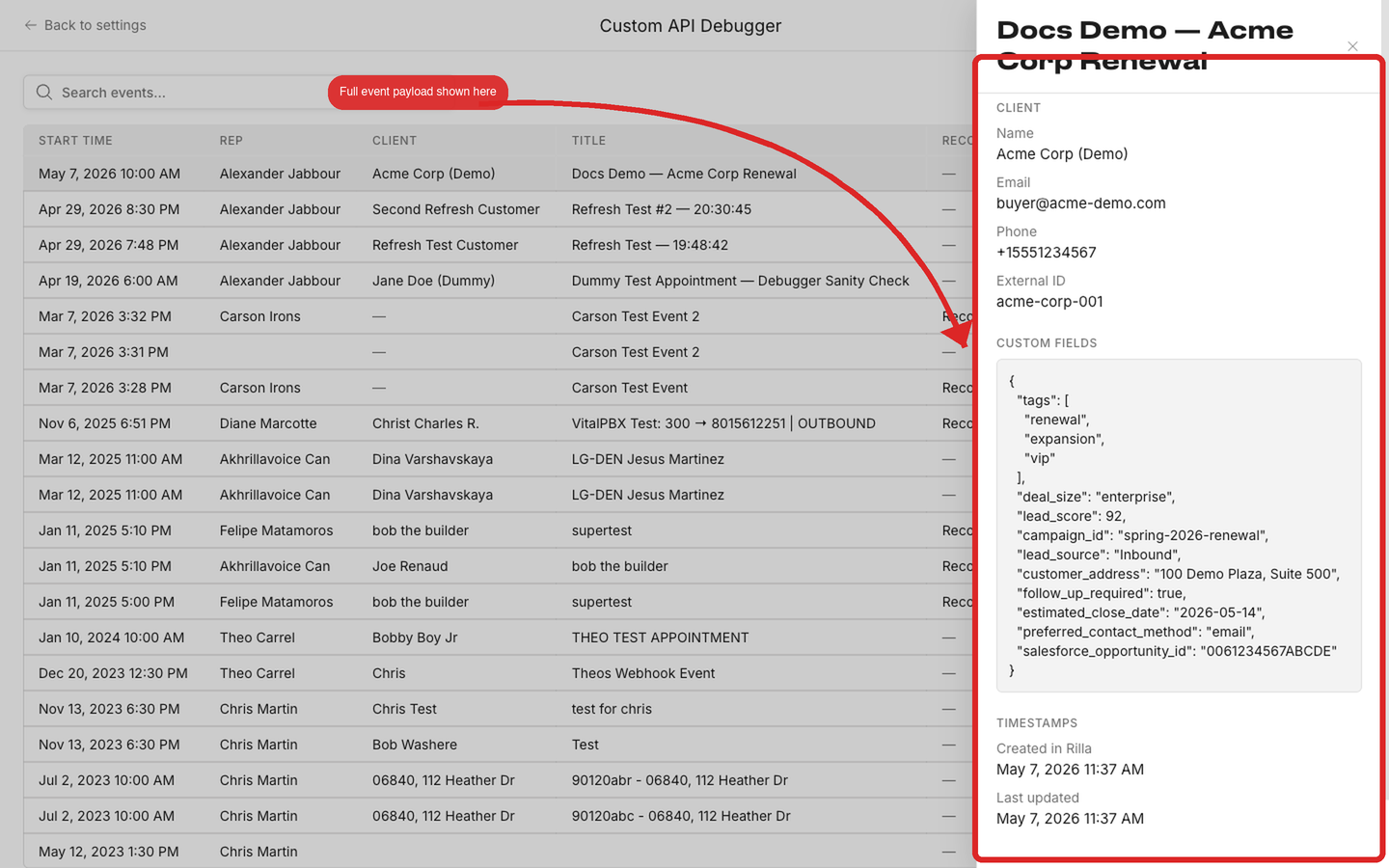
Once your integration is sending events, you can verify them inside Rilla's web app. The Custom API Debugger lists every event we received against your API key and shows the full payload exactly as Rilla stored it. Use it to confirm field values, troubleshoot mappings, and check timestamps without needing access to logs.
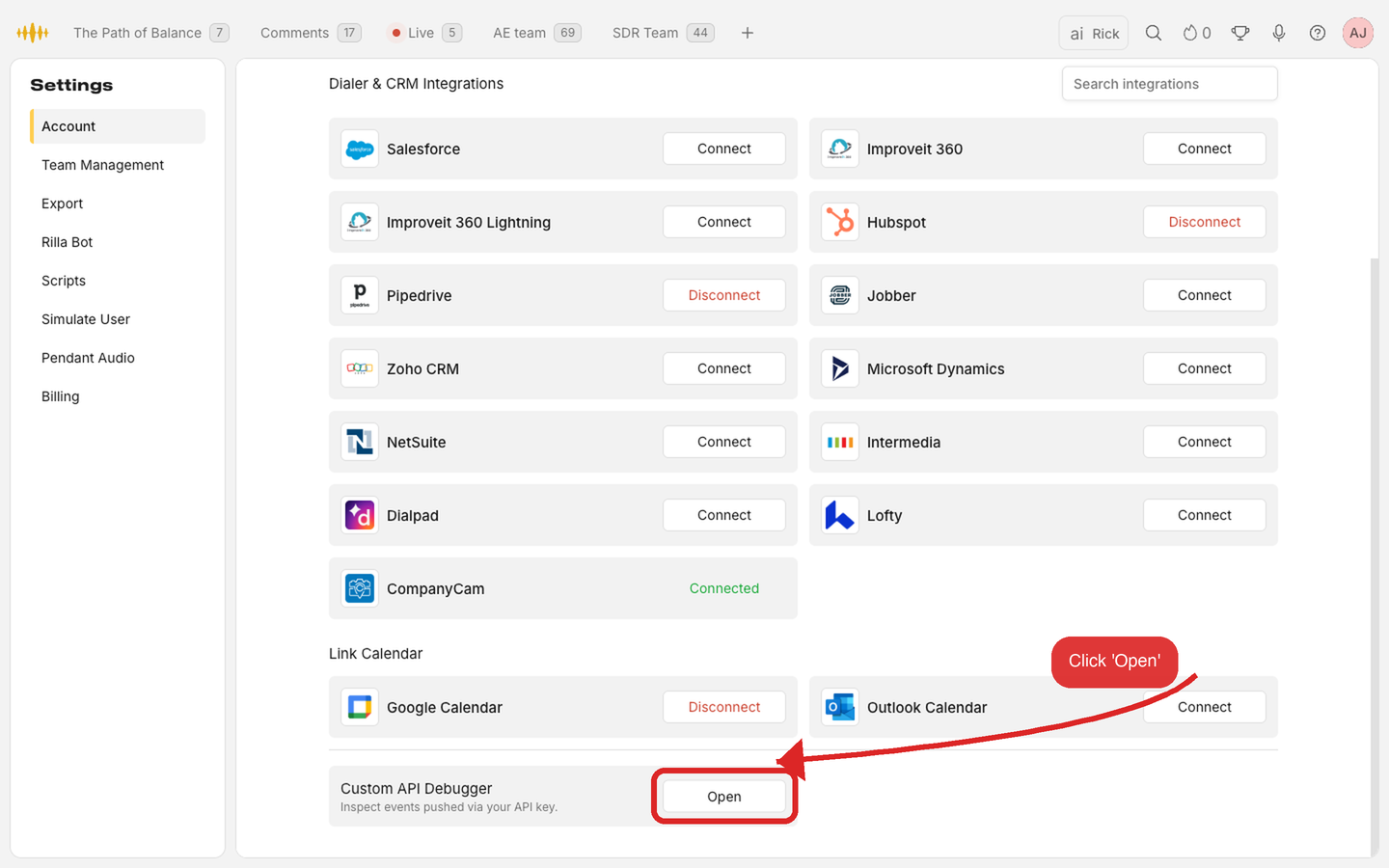
In the Rilla web app, go to Settings → Account and scroll to the bottom. Click Open in the Custom API Debugger section.
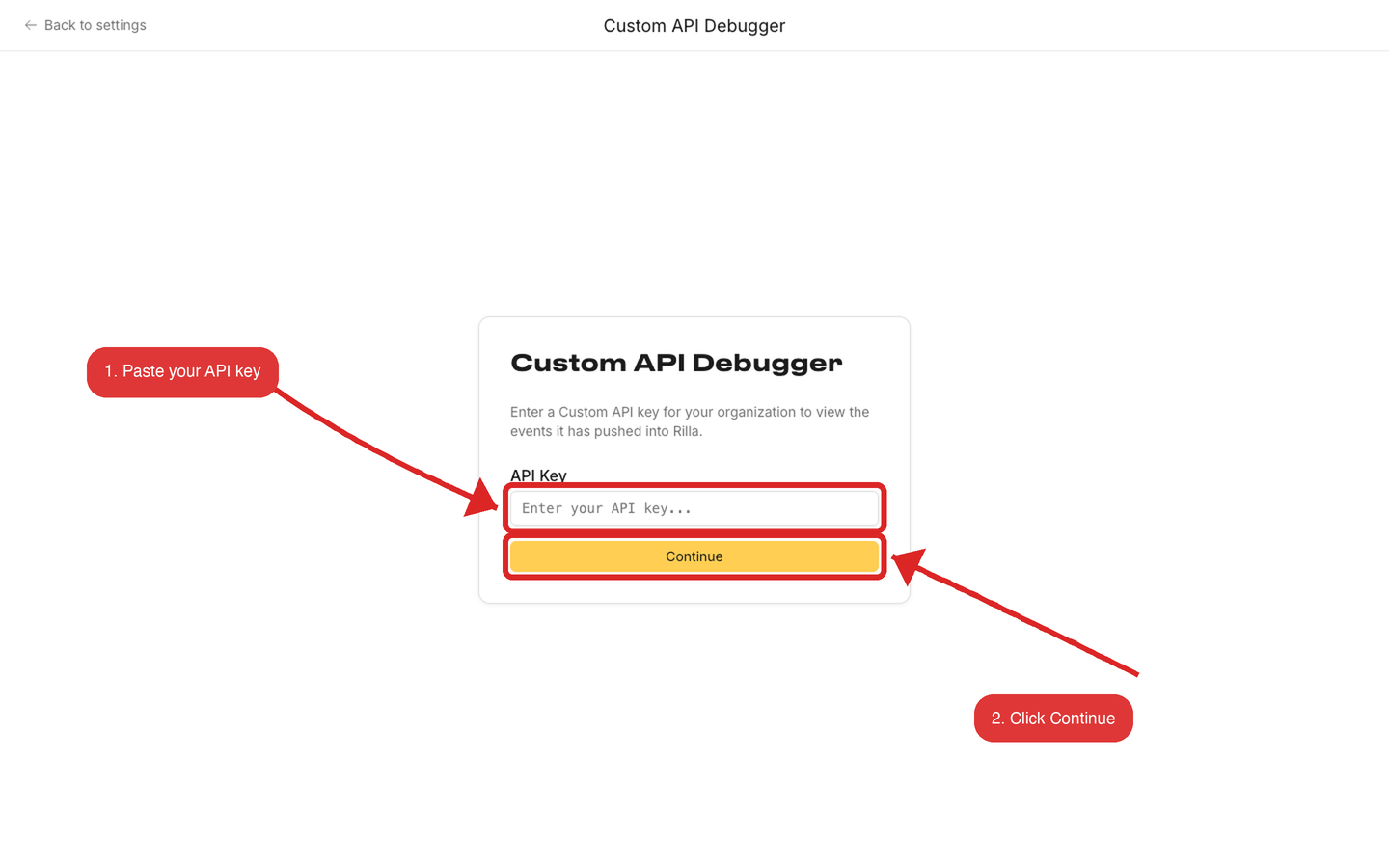
Paste the same x-api-key you use to call the API, then click Continue. The key is only used in your browser session to fetch the events for your organization. It is not stored.
You'll see every appointment Rilla received with that key, most recent first. Each row shows the rep, client, title, recording status, outcome, and the timestamp Rilla recorded the event.
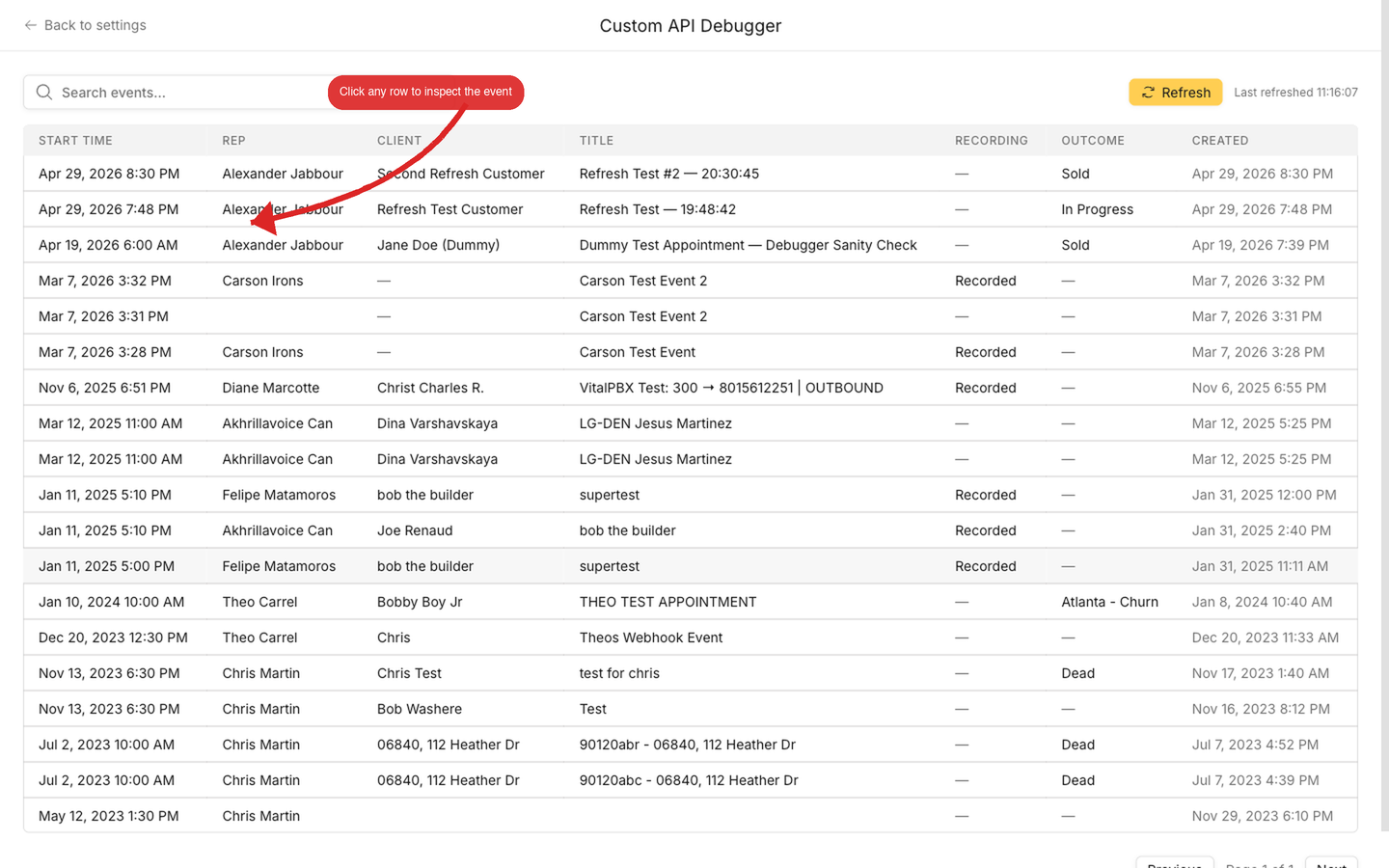
Use the search box to filter by rep name, client name, or appointment title. The Refresh button re-fetches the latest events.
Click any row to open the detail panel. It shows the IDs, appointment fields, rep, client, any custom_fields you sent, and the exact timestamps Rilla recorded — useful for confirming that what you sent matches what we stored.
If an event isn't here
If you sent a request and don't see the event in the debugger, the API likely rejected it. Check the response status from your POST. A 4xx response means the event never reached storage. See Error Codes for what each status means.
Error Codes
The API returns standard HTTP status codes. On error, the response body is a plain string describing the issue.
| Code | Status | Description |
|---|---|---|
200 | OK | The request was processed successfully. |
400 | Bad Request | Malformed request or missing required fields. Common causes: event_id, user_email, or title missing; customer object missing or incomplete; timestamp format invalid; media_url provided with CALL_AUDIO_WITH_LOCATION but location missing; body is not valid JSON. On /custom/appointment/match: event_id or conversation_id missing. |
403 | Forbidden | x-api-key is missing or not recognized. Enforced at the API gateway, before the request reaches the application. |
404 | Not Found | Either the URL path or HTTP method doesn't match a route (body is {"message": "No matching route..."}, see the callout below), or a targeted record was not found in your organization. The latter is returned by DELETE /custom/appointment/{id} (appointment ID not found) and POST /custom/appointment/match (event_id or conversation_id not found). |
409 | Conflict | Returned by DELETE /custom/appointment/{id} when the appointment has a recording linked to it. Rilla keeps the appointment rather than deleting it. |
422 | Unprocessable Entity | Valid JSON but cannot be processed. Common causes: user_email doesn't exist in Rilla; user_email belongs to a different organization; a recognized key not mapped to an organization. On /custom/appointment/match: the conversation has no recording to link. |
500 | Internal Server Error | Unexpected server error. The event is forwarded to a dead-letter queue for investigation. |
404 with 'No matching route'
If the response body is {"message": "No matching route..."}, the URL path or HTTP method didn't match an endpoint. This is not an authentication problem, even if your x-api-key is set. Check the exact path (/custom/appointment, /custom/appointment/{id}, or /custom/appointment/match), the HTTP method, and watch for trailing slashes or spaces.
400, 403, 404, 409, and 422 errors are permanent — retrying the same payload will not help. Fix the data first. 500 errors may be transient — retry with exponential backoff.
Rate Limits
The Custom CRM API is rate limited to 5,000 requests per second per API key, enforced at the API gateway. Requests over the limit receive a 429 Too Many Requests response.
High-volume Usage
If your integration requires high-throughput or bulk operations, reach out to support@rilla.com before going live.
Best Practices
- Retry with exponential backoff on
429or5xxresponses. - Avoid polling at high frequency.
- Batch appointment creation on your side before calling the API.